Page 1 of 1
Artwork on Serviigo and Mediabrowser is wrong

Posted:
Mon Aug 12, 2013 5:21 pmby gbscobel
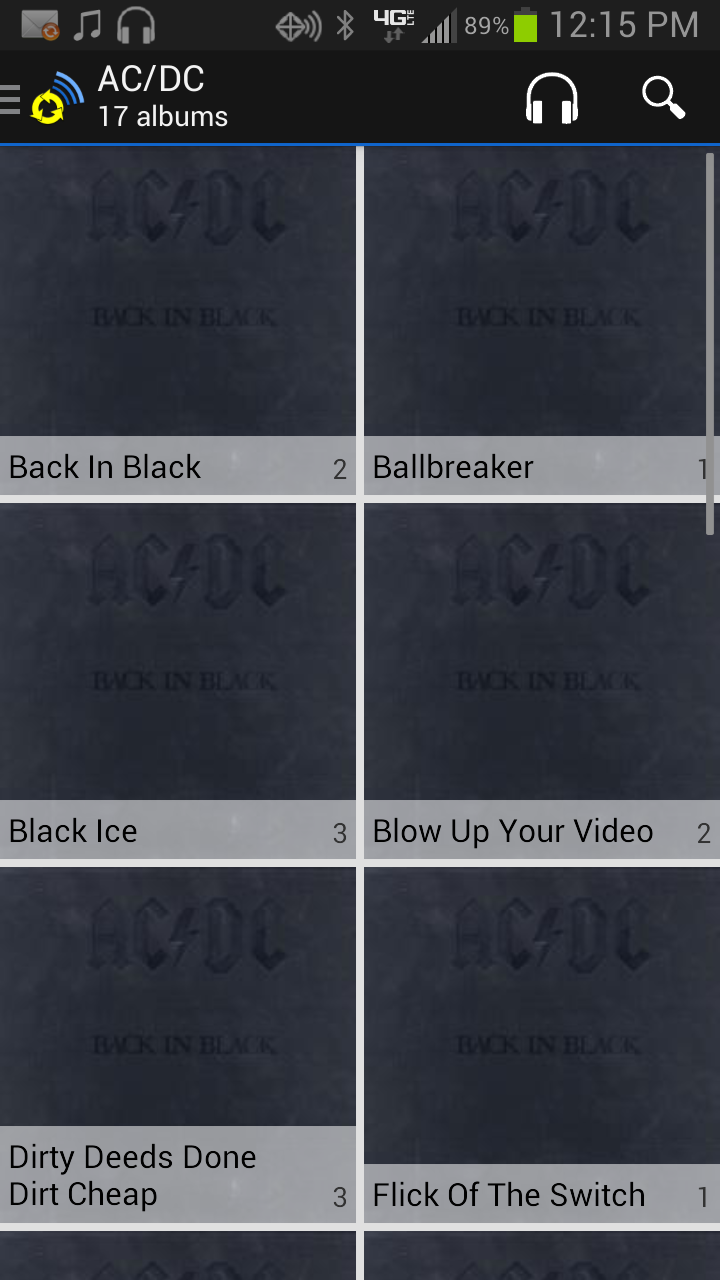
- Screenshot from app
- Screenshot_2013-08-12-12-15-46.png (195.96 KiB) Viewed 13213 times
Serviio Pro 1.3/Serviigo 3.0 - When viewing Albums for a specific artist either through the Android App or Mediabrowser, the Album artwork that displays on the initial Artist Tile is what displays for every album and track under that Artist in every case. Wonder if anybody else has experienced this, it was happening even before the updates which I just ran today so it's not that. Any ideas?
Re: Artwork on Serviigo and Mediabrowser is wrong
Posted:
Mon Aug 12, 2013 7:04 pmby zip
do you have the files in different folders? ie per album? Or all in one heap?
Re: Artwork on Serviigo and Mediabrowser is wrong
Posted:
Mon Aug 12, 2013 7:20 pmby gbscobel
Multiple directories - main directly subdivided into 26 alphabetical folders and by artist name within each of those. I already went through and deleted all .jpg files in all folders just in case that was the issue but still have the problem.
Re: Artwork on Serviigo and Mediabrowser is wrong
Posted:
Mon Aug 12, 2013 7:25 pmby zip
Is it happening only for this artist?
Re: Artwork on Serviigo and Mediabrowser is wrong
Posted:
Mon Aug 12, 2013 7:37 pmby gbscobel
Nope, it's happening for every artist who has more than one album.
Re: Artwork on Serviigo and Mediabrowser is wrong
Posted:
Mon Aug 12, 2013 8:37 pmby zip
Can you post a screenshot of how it looks in MediaBrowser?
Re: Artwork on Serviigo and Mediabrowser is wrong
Posted:
Mon Aug 12, 2013 8:42 pmby gbscobel
Here's an example, Lee Aaron has 5 albums in my database, when I go to her Artist screen, it lists the albums down the side (with no artwork). No matter which album I choose, the art is always the same.
Re: Artwork on Serviigo and Mediabrowser is wrong
Posted:
Mon Aug 12, 2013 8:53 pmby zip
hmm... weird, it works for me.
Can you take one of the songs and copy it somewhere else in your shared area and see if that one get the proper art? Also, do the songs have proper art when access through Folders category?
Re: Artwork on Serviigo and Mediabrowser is wrong
Posted:
Mon Aug 12, 2013 9:00 pmby gbscobel
It's very odd, I know. Folders mode shows exactly the same thing, every track has the same artwork on it. When I copied a file to a different location, the file comes up with no artwork whatsoever. Now, I will say that this folder of music is where my Itunes library feeds from and it's very possible that the artwork may have come from Itunes artwork downloader. Is it possible that is causing this issue? I'm not sure where your program is getting the artwork from.
Re: Artwork on Serviigo and Mediabrowser is wrong
Posted:
Mon Aug 12, 2013 9:28 pmby zip
It gets it from the file itself, or (and this is prioritized) from a local file (e.g. folder.jpg) - see Local poster section of
http://www.serviio.org/index.php?option ... icle&id=12If you have a downloader which sticks the same file into all these folders, then it'd be it.
Re: Artwork on Serviigo and Mediabrowser is wrong
Posted:
Mon Aug 12, 2013 9:32 pmby gbscobel
I don't think that's it because I have deleted all image files from these directories and there were really only a handful that had folder.jpg files. Really doesn't make any sense, every thing else I view the file with that uses the id3 tag shows the correct cover art, it only seems to be this program that is displaying this way.
Re: Artwork on Serviigo and Mediabrowser is wrong
Posted:
Mon Aug 12, 2013 9:46 pmby zip
the images might be hidden...?
Re: Artwork on Serviigo and Mediabrowser is wrong
Posted:
Mon Aug 12, 2013 9:51 pmby gbscobel
Sorry, I checked for hidden files as well
Re: Artwork on Serviigo and Mediabrowser is wrong
Posted:
Mon Aug 12, 2013 11:05 pmby jhb50
Don't know if this helps, but my experience with Serviio, is that once an image is cached for a file then it will not change even if the source image changes, so in your case even if you " have deleted all image files from these directories", the originally cached images will be used. Only way to fix that is to delete the cache and let it rebuild.
Re: Artwork on Serviigo and Mediabrowser is wrong
Posted:
Mon Aug 12, 2013 11:55 pmby zip
It should refresh that if you have enabled Updates to currently shared files in the console.
Re: Artwork on Serviigo and Mediabrowser is wrong
Posted:
Tue Aug 13, 2013 12:01 amby gbscobel
Ok, I guess I'll just have to live with it. To be honest, it's not the biggest deal in the world, just a little annoying.
Re: Artwork on Serviigo and Mediabrowser is wrong
Posted:
Wed Aug 14, 2013 9:24 pmby gbscobel
Just as an update, I did end up recreating the cache for my music folder and it did fix a lot of the issue, I no longer have artwork listed the same for every album and track by an artist. However, I'm now finding a lot of albums/tracks that are simply missing artwork altogether but I see the artwork when I look at it in an ID tag program or through itunes so I know there is artwork linked there. Is there anything to check in this situation? Thanks
Re: Artwork on Serviigo and Mediabrowser is wrong
Posted:
Wed Aug 14, 2013 10:22 pmby zip
can you send me an example file to zip[at]serviio[dot]org ?
 mediabrowser2.pdf